












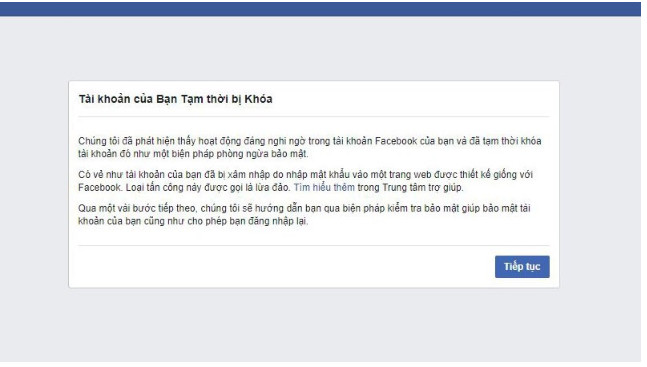
If you encounter the message “Your account has been temporarily locked” while logging into Facebook, it means your account has been affected by the Checkpoint Facebook. So, what exactly is the Facebook Checkpoint error, and how can you quickly resolve this issue on your mobile device or computer? Let’s explore the details with Minsoftware in this article.
1. What is Facebook Checkpoint?
Checkpoint is an automated security mechanism implemented by Facebook to safeguard user information against the increasing risk of data breaches.
If, for any reason, your sensitive personal data (such as phone number, date of birth, or email) is exposed and a hacker gains access to your account, Facebook Checkpoint is triggered when the system detects a login attempt from an unfamiliar device.
Once activated, Facebook prompts the user to verify their identity. If the person attempting to log in is not the legitimate account owner, Facebook temporarily locks the account to prevent unauthorized access.
2. Why Does Your Account Encounter a Facebook Checkpoint Error?
There are several common reasons why your Facebook account may trigger a Facebook Checkpoint error:
- Logging into your Facebook account from an unfamiliar IP address.
- Using a new web browser that has never accessed your Facebook account before.
- Logging into multiple Facebook accounts on the same device.
- Violating Facebook’s policies, such as excessive comment spamming, mass sharing, excessive liking, spamming others’ profiles, or posting sensitive images.
- Your Facebook account has been reported by other users.
3. Common Types of Facebook Checkpoint Errors
There are five main types of Facebook Checkpoint errors that users frequently encounter:
- Photo Verification Checkpoint: You must correctly identify and select the profile pictures of your friends as requested by Facebook to verify your identity.
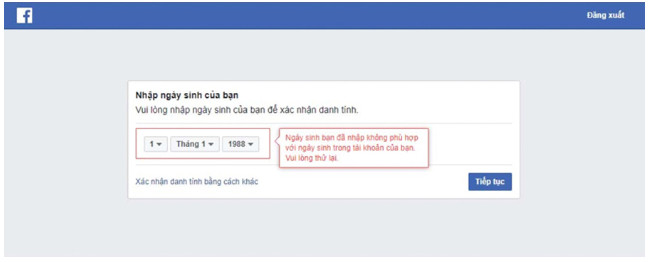
- Date of Birth Checkpoint: Facebook asks users to enter their date of birth as registered on the account to confirm their identity.
- Phone Number Checkpoint: Facebook sends a verification code to the registered phone number, and entering the correct code will unlock the account.
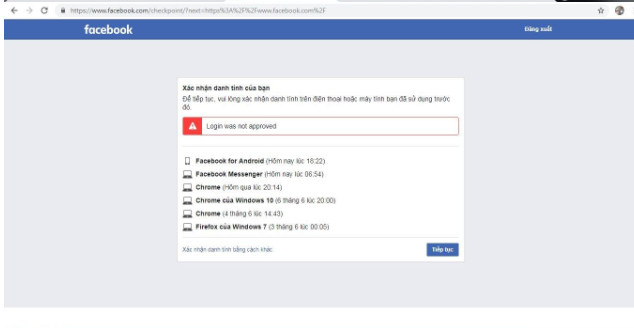
- Browser Verification Checkpoint: If you log in from an unfamiliar browser, Facebook will send an identity verification request to a previously trusted browser. You need to approve the login to proceed.
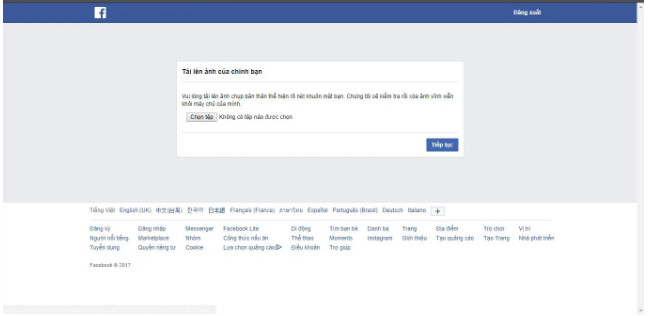
- 72-Hour Checkpoint: Facebook requires users to submit a clear image of their identification documents (such as a national ID card, passport, or driver’s license) to verify identity. Facebook will then review and compare the provided information before unlocking the account.
4. How to Quickly and Successfully Bypass Facebook Checkpoint
Below are simple step-by-step methods to resolve Facebook Checkpoint issues based on each type:
4.1. Photo Verification Checkpoint
This is one of the most common Facebook Checkpoint security measures to prevent hackers from taking over accounts. Since hackers cannot accurately identify a user’s real friends, Facebook asks you to match profile pictures with the correct names of your friends. To unlock Facebook Checkpoint, simply select the correct images associated with your friends’ names.
4.2. Date of Birth Checkpoint
The method to bypass Facebook Checkpoint for date of birth verification is similar to the photo verification method. You need to enter the exact date of birth you used when registering your Facebook account.
Note: If the date of birth you previously registered was fake or is set to “Only Me” on your profile, the verification process may take longer.
4.3. Phone Number Checkpoint
One of the easiest ways to recover a disabled Facebook account is to enter your registered phone number or email (if not previously linked). Facebook will then send a verification code, which you need to enter to regain access to your account.
4.4. Browser Verification Checkpoint
To quickly resolve the Facebook Checkpoint issue caused by browser verification, follow these steps:
- First, log in to Facebook on a previously used browser where you have successfully accessed your account before.
- Then, attempt to log in on a new browser. Facebook will send a verification request to your account on the old browser.
- Simply approve the request on the old browser to unlock your account.
4.5. 72-Hour Checkpoint
The 72-hour Facebook Checkpoint is more complex since Facebook requires you to provide identification documents. Follow these steps:
- Step 1: Fill in the requested information, including Full Name, Date of Birth, Place of Birth, and Government-issued ID number (such as National ID, Passport, or Driver’s License).
- Step 2: Attach the required identity documents and submit the request.
- Step 3: Wait up to 72 hours for Facebook’s support team to review and restore access to your account.
5. How to Prevent Facebook Checkpoint Lock?
Since Checkpoint is a default security feature on Facebook, you cannot disable it. However, you can minimize the risk of encountering Checkpoint by following these steps:
- Complete your Facebook profile with accurate personal information and set it to private mode.
- Avoid adding or following unknown accounts randomly.
- If you need to log in multiple Facebook accounts on the same IP, consider changing your IP regularly for security.
- Enable two-factor authentication (2FA) to enhance account security.
6. Frequently Asked Questions
6.1. Can I Use a Birth Certificate Instead of an ID to Unlock Checkpoint?
Typically, Facebook requires a government-issued ID such as a National ID, Passport, or Driver’s License to resolve a Checkpoint issue. If you can only provide a Birth Certificate, you should contact Facebook Support for further assistance.
6.2. Will Facebook Checkpoint Unlock Automatically?
No, Checkpoint will not be unlocked automatically unless you follow the required verification steps as mentioned above.
Join the MIN Software Community for more powerful tools and resources to grow your business! 🚀
𝗛𝗼𝘁𝗹𝗶𝗻𝗲: +(84)865.866.962
𝗧𝗲𝗹𝗲𝗴𝗿𝗮𝗺 https://t.me/+1z8UKK2KEOsyMjll
𝗙𝗮𝗻𝗽𝗮𝗴𝗲: https://www.facebook.com/MINSoftware.Global.Official/






